
NotebookLM is most interesting when you stop treating it as document chat. The durable product idea is a research workflow: gather sources, ask questions, compare evidence, create study artifacts, and keep provenance visible.
By mid-2026 the surface area is wider than “podcast my PDF.” Public product materials document Audio Overviews (including interactive modes and many languages), Video Overviews, Studio formats such as mind maps and reports, and—around June 8, 2026—agentic chat upgrades (Google describes Gemini 3.5 / Antigravity-powered deeper research, code execution in a notebook sandbox, richer export formats, and optional web-assisted source gathering). Plan tiers and quotas matter; verify in-product.
I am not claiming a secret keynote. I am describing the pattern that makes NotebookLM durable: source-grounded synthesis with multi-format outputs—now under pressure from agent features that can expand the corpus for you.
Reader promise: You will get a practical model for turning source-grounded AI into a research workflow—without treating new agent features as a license to skip primary reading.
Fast Context
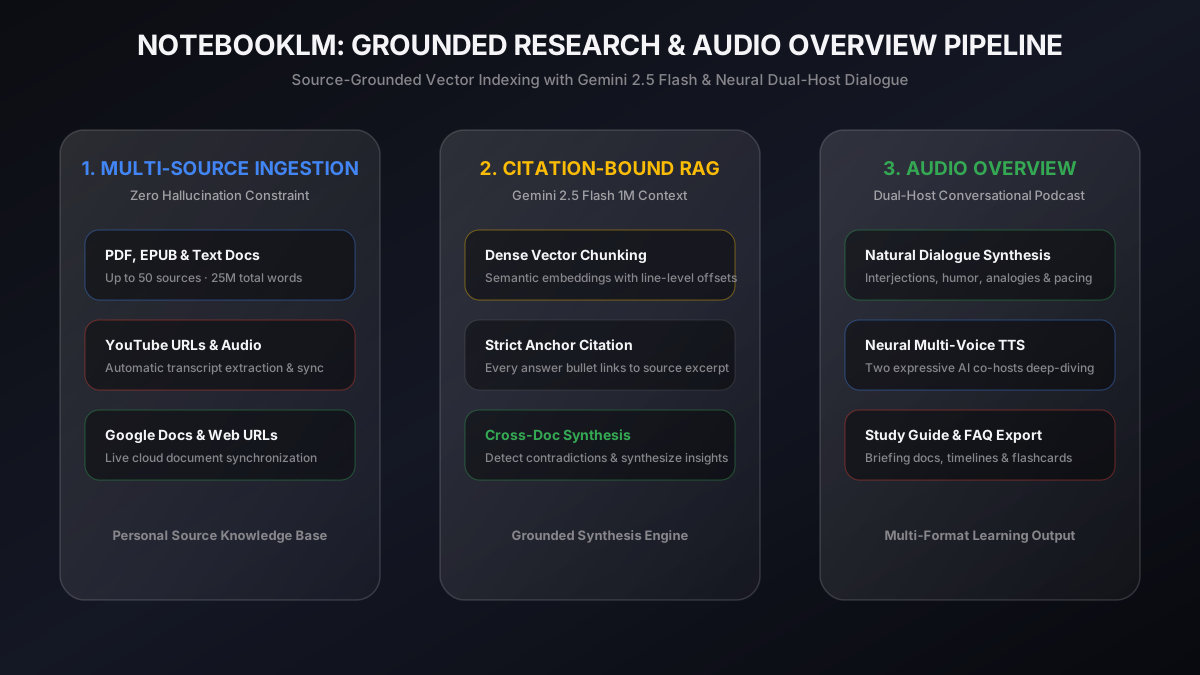
NotebookLM is Google’s research/thinking partner grounded primarily in sources you provide. You can upload PDFs, websites, YouTube links, audio, Google Docs/Slides, and more. Audio Overview remains the famous mode: conversational deep dives between AI hosts. Video Overview and other Studio artifacts make the same sources usable in different cognitive modes.
The mid-2026 agentic upgrades raise a sharper risk: if the tool can also search the open web and write code against your notebook, grounding discipline becomes a user skill, not an automatic property of the brand.
Google NotebookLMTL;DR
The product works best when source grounding remains visible. Use it to navigate a known corpus, not to invent facts about the open web—especially when web-assisted collection is enabled. Audio/Video Overviews and other study formats make the same sources useful in different modes. Collaboration turns a notebook into a shared research space. Generated summaries still need citation discipline and human review. Large or auto-expanded corpora can create false confidence if the set is incomplete or biased.
What Shines
Source-grounded answers
For students, analysts, founders, and engineers, the killer property is not eloquence. It is answering from this set of PDFs, notes, and transcripts. That reduces a whole class of open-web hallucination—though it does not eliminate mis-summarization inside the corpus.
Multi-format study surfaces
Audio Overviews for commute orientation; Video Overviews when diagrams matter; reports, FAQs, and mind maps when you need scannable structure. Same sources, multiple interfaces. Google’s own help pages warn that AI audio/video can contain inaccuracies or glitches—treat that as a feature of the medium, not a footnote.
Multimodal ingestion
Slides, video, audio, and docs match how research actually arrives: messy. The product job is to normalize that mess without erasing provenance.
Low score on unsupervised publishing is intentional discipline, not a product insult. Scores are my judgment.
What I Would Watch
- Citation drift — summaries that sound right but reattribute claims
- Corpus bias — incomplete or auto-collected source sets that create confident wrong worlds
- False certainty — smooth narration that hides uncertainty
- Sensitive documents — sharing settings for proprietary material
- Agent overreach — code execution or web adds that outrun your review capacity
- Plan-tier surprises — quotas for Audio/Video Overviews and advanced features vary
A Research Workflow That Actually Works
1. Collect — put primary sources in deliberately; quality over quantity. If the agent proposes web sources, triage them like a literature review, not like autocomplete. 2. Extract claims — ask for claims with source pointers, not just summaries. 3. Compare evidence — force contradictions into the open. 4. Draft synthesis — outline first, prose second. 5. Mark uncertainty — explicitly list what the corpus does not cover.
Audio Overview sits between steps 1 and 2 for orientation, and sometimes after step 4 as a “listen for holes” pass. I do not publish from audio alone. If code ran in the notebook sandbox, I treat outputs like any other untrusted computation: check inputs, check units, check that the script answered the question I asked.
Things I Learned
- The value of a research agent is navigation through a source set, not only answers.
- Good outputs preserve provenance: what source, what claim, what evidence, what uncertainty.
- Multi-format outputs are a moat only while grounding stays intact.
- Agentic features raise throughput and raise the cost of sloppy review.
How I Would Apply This
For portfolio research, competitive analysis, or course work:
- One notebook per project with deliberate sources
- Claims in a comparison table before prose
- Audio Overview for orientation, not for citation
- Human pass with citations before anything public
- Clear source trail for every external claim
Practical Prompts I Reuse
- "List five claims that appear in more than one source. Cite each."
- "What do these sources disagree about? Quote both sides."
- "What questions can this corpus not answer?"
- "Create a study outline with dependencies: concepts I must learn first."
- "Generate a briefing for an engineer who has ten minutes."
Bottom Line
NotebookLM points toward AI research tools that are grounded, multimodal, and multi-format. The winning version is not the one that answers fastest. It is the one that keeps the evidence close to the answer—and makes it easy to hear, challenge, and cite—even when the agent can expand the corpus for you.
Sources
- NotebookLM — product home
- Generate Audio Overview — formats, interactive mode, caveats
- Generate Video Overview — video study artifacts and caveats
- Do your best research with NotebookLM — June 2026 agentic upgrade notes (verify plan availability)
- Feature notes above reflect publicly documented capabilities; confirm limits and tiers in-product